
Digital menu board guide

A digital menu board lets you change menus and prices without waiting for a reprint. This guide covers screen placement, layout, menus that change through the day and running several branches, and ends with a checklist.
The trouble with a printed menu is that it starts going out of date the day it is printed. Prices change, an item sells out, breakfast ends, and the board stays the same. A digital menu board fixes that: the menu lives on a screen, you change it from a panel, and at the right time the breakfast menu switches to lunch on its own. This guide covers placement, layout, menus that change through the day and running several branches, with a checklist at the end.
Why a digital menu?
The real gain is not the modern look but a menu that follows the rhythm of your business.
- Price changes do not wait for the printer. Enter the new price in the panel, approve it and it goes to the screens. No reprints, stickers or crossed-out prices.
- The menu follows the clock. Breakfast, lunch and dinner menus appear at their own times without anyone touching the screen.
- Sold-out items come off quickly. Taking an item off air is a few clicks.
- Promotions get noticed. A short video beside the menu draws attention to a new product or today's offer.
- Branches speak with one voice. The same design and prices everywhere, with branch-specific content where you need it.
Screen placement and size
Even the best content is wasted on a screen in the wrong place. Before installing anything, follow your customers' path: where they come in, where they queue and where they make up their minds.
Placement
- Main menu screens belong behind the till or counter, at a height the queue can see comfortably. Too high and people crane their necks; too low and the person in front blocks the view.
- Check for glare from windows and spotlights. Daylight through glass can make even a bright menu unreadable.
- A screen by the door or in the window is for people deciding whether to come in. A few highlighted items work better there than a long list.
- Steam, grease and heat shorten a screen's life, so keep away from the hob and fryer line.
Size and orientation
Size depends on how far away customers stand. For people a few metres back in the queue, a mid-sized TV behind the counter is usually enough; large halls or high ceilings may call for the next size up. Before buying, try the smallest text on your menu on a screen of that size, viewed from where customers will stand.
Portrait screens suit long product lists, drinks menus and narrow walls. Rotate the picture either in the TV's own settings or in MIA, never both, or the image ends up on its side again. MIA supports rotation of 0, 90, 180 and 270 degrees.
Layout: menu, promo video and clock
A good menu board splits the screen into zones and gives each one a single job. In MIA, programs are made of scenes and scenes of zones. There are ready layouts for landscape and portrait, or you can draw zones freely. Each zone is assigned a folder, and that folder's content plays in turn.
| Zone | What it shows | Content type |
|---|---|---|
| Main zone | Menu and prices | Image or HTML |
| Side zone | Promotion, new product, short ad | Video (MP4, WebM) or image |
| Bottom band | Clock, scrolling text, notices | Clock, scrolling text or header band widget |
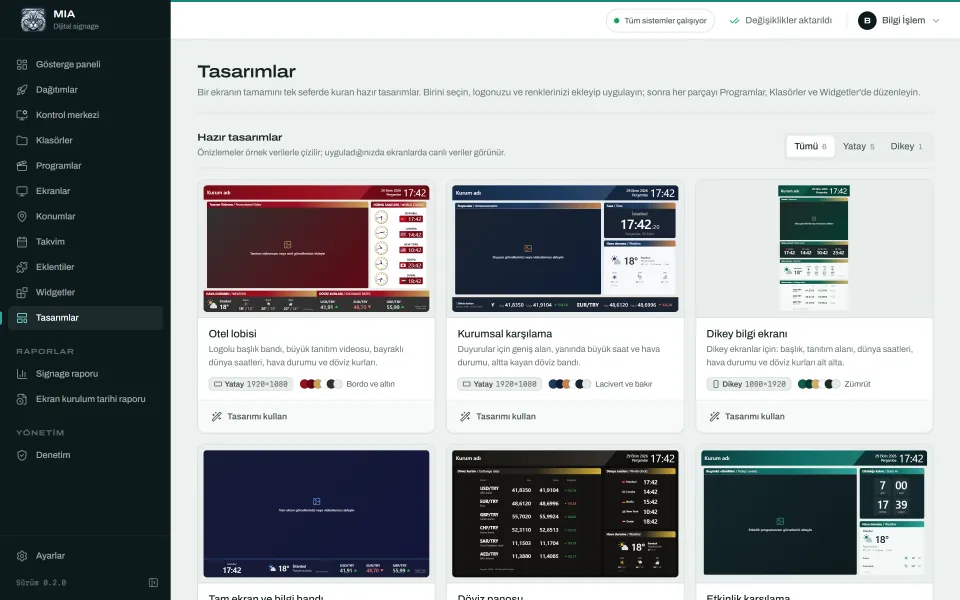
If you would rather not start from scratch, use a ready design. MIA ships with 6, from hotel lobby and corporate welcome to an exchange rate board and event welcome. For a menu board, "Tam ekran ve bilgi bandı" (full screen with information band) is usually the best start: as the name suggests, it gives most of the screen to one piece of content and keeps a separate band for information. For portrait menus, the 1080×1920 portrait information screen is a good base.
When you apply a design, you enter your logo, business name and colours, and MIA creates the program, folders and widgets for you. There are 7 colour palettes, a choice of fonts and a logo library, and zone titles can be bilingual. Save your own layout under "Kendi tasarımlarım" (my designs) and reuse it for new branches. Browse them all on the widgets and designs page.
Content tips: readability, contrast and photos
A customer gives a menu board a few seconds, so the content has to work in that time.
- Write less, write bigger. Do not cram everything onto one screen. Separate categories and split long lists across two screens or two scenes.
- Keep contrast high. Light text on a dark background, or the reverse. If text sits on a photo, put a semi-transparent panel behind it.
- Line up the prices. One column, one size, so the eye can follow each row.
- Be selective with photos. Show the few items you want to push with a good picture rather than photographing everything. Photos should look like the real dish.
- Limit movement. Keep video in the side zone and the menu itself still. Nobody can read a price list that keeps scrolling.
- Prepare for the screen. Make images at the screen's resolution and aspect ratio; JPEG, PNG, WebP and AVIF files upload directly.
How prices are updated
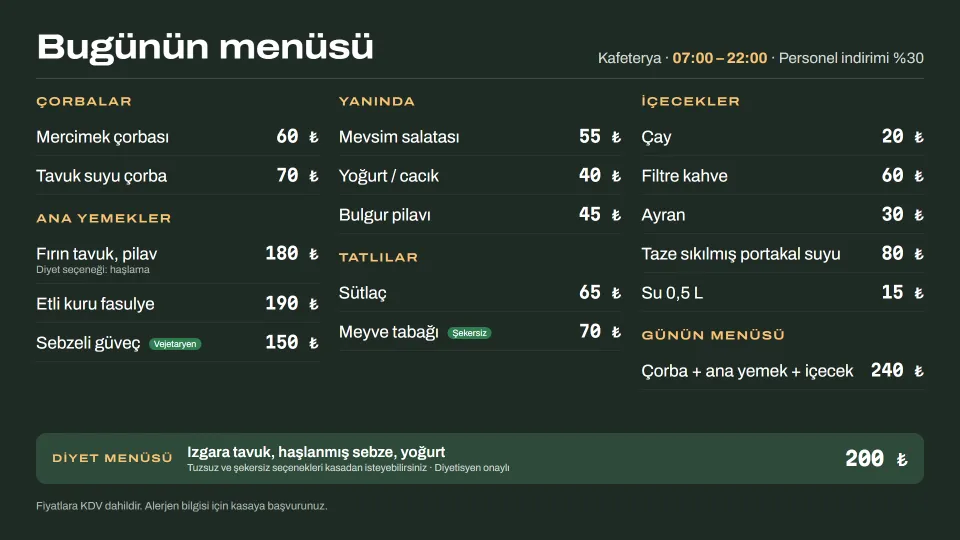
Today, price updates are made in the panel. If your menu is designed as an image in a graphics tool, you upload the new image to the folder; if it is built as HTML content, you edit the text in the panel. Changes do not go out by themselves: they wait under "Dağıtım bekleniyor" (pending deployment) and go live deliberately with one click, so a half-finished price list never reaches a screen by accident. Prices flowing automatically from your POS or price list is not a ready feature today. That link can be built for your installation if you need it.
Menus that change through the day
Dayparting, changing the menu by time of day, is where digital menus earn their keep. In MIA every content item can have a daily time window, weekday rules and a date range. Scenes have their own time rules too, so the whole layout can change with the clock.
| Time | Main zone | Side zone |
|---|---|---|
| 07:00–11:00 | Breakfast menu | Coffee and pastry offer |
| 11:00–16:00 | Lunch menu | Soup of the day, lunch deal |
| 16:00–22:00 | Evening menu and desserts | Dessert promo video |
| Saturday and Sunday | Weekend brunch menu | Brunch photos |
You can also make an item play once every N loops, or cap how many times a day it plays on each screen. A seasonal item drops off air when its date range ends, and the calendar shows campaigns in month, week and day views.
One detail matters: the player applies these rules itself, using the server's clock. TV clocks are often wrong, but because MIA screens follow the server's time, breakfast comes off at the right moment, and screens keep applying the rules even if the network drops.
Several branches: targeting with tags
As branches multiply, keeping track of what plays where gets harder. MIA handles this with tags. Screens get city, district and orientation tags automatically, and you can add your own type:value tags such as "branch:harbour" or "area:terrace".
- The shared menu plays from one folder in every branch, so a price changes once and goes everywhere.
- A branch-only promotion shows only on screens carrying that branch's tag.
- Content can be excluded by tag: a branch without breakfast service never shows the breakfast menu.
- Every deployment is a numbered record with a status for each screen.
- The signage report shows how often and for how many seconds each item played on each screen. For a campaign run with a supplier, you can share it as CSV.
More scenarios are on the restaurants and cafés page.
Offline playback and hardware
The menu stays up when the internet drops
A blank menu board in the lunch rush is not acceptable. The MIA player keeps the last program in memory and local storage, so playback continues if the server or network goes down. The Android app stores videos and images on the device, and after a power cut it starts and plays the menu even without reaching the server. No warning appears on screen. Only internet-dependent items are affected: weather and exchange rates stay at their last values, and YouTube videos will not play. That is why we recommend uploading promo videos as MP4 files rather than linking to YouTube.
Which device?
- Android box or Android TV: the most common and economical choice. The MIA Player app starts on boot, runs full screen and keeps the screen awake.
- Smart TV browser: Samsung and LG TVs from 2018 onwards work with their built-in browser, without an extra device.
- Samsung signage displays (SSSP/Tizen): for professional screens that stay on for long hours, using a signed MIA Player package.
- Windows or Linux mini PC: an existing kiosk computer can become a player with a browser in kiosk mode.
See the Android TV and boxes page for device choice and setup. To blank the screen at closing time, use the "Kapat" (off) command in the control centre; it does not power the device down, it turns the picture black. Hardware-level jobs such as switching screens on and off on a schedule can be built for your installation if needed.
Checklist before you install
- Have you found the spot where customers queue and decide?
- Have screen height, angle and glare been checked on site?
- Landscape or portrait? Is rotation set in one place only?
- Is there a power socket and, ideally, a wired network point by the screen?
- Are menu images made at the screen's resolution with enough contrast?
- Are breakfast, lunch and dinner times and weekend rules agreed?
- Have branch tags been planned from the start?
- Who updates prices and who publishes them? Are editor and admin roles assigned?
- Are promo videos uploaded as MP4 so they are stored on the device?
- Has someone decided what the screen shows at closing time?
Conclusion
A good digital menu board needs a sound plan more than an expensive screen: a spot where customers will see it, a readable layout, content that follows the clock and a workflow that updates prices safely. MIA lets you build that on your own server: your data stays with you, there is no monthly fee per screen and playback continues during outages. To start with a few screens in one branch, use the 30-day trial license and try your menu on real screens.
Try MIA: 30-day trial license
Install it on your own server, pair your screens and use the whole panel for 30 days.
Get a trial license